At the end of each month, accounting staff open every invoice issued that month and check things like: is the invoice number correct, does the date match, is the exchange rate current, is the VAT setting appropriate, does the language match the customer's country, and does the line-item wording follow convention.
Miss something, and you might not notice until after it's already been sent to the customer, requiring a correction afterward.
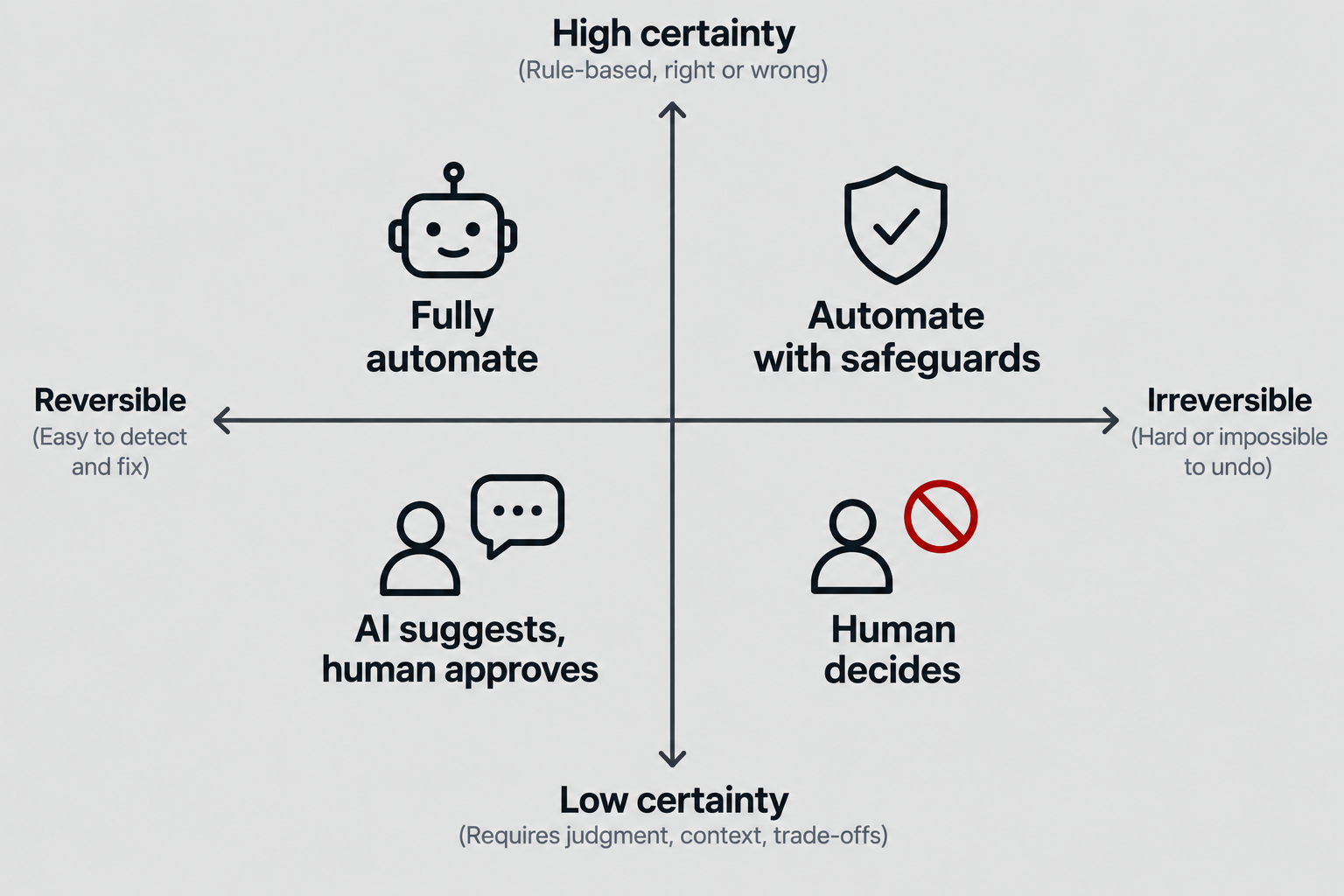
That said, simply "handing this whole review process over to AI" isn't a safe option either. Once an invoice is issued, it's hard to take back — and if an AI's automatic correction of an amount or exchange rate goes to a customer unchecked, the damage can be irreversible.
The key here is a mechanism that connects an AI Agent to an existing business system safely, and only within the necessary scope.
At Bunbu, we built this using a protocol called MCP (Model Context Protocol). This article uses our actual invoice review process as an example to explain what MCP is, and what needs to be designed when integrating AI into an internal business system.
I. What is MCP (Model Context Protocol)?
MCP is a standard protocol for connecting AI models (AI Agents such as Claude) to external systems and data sources.
Up to now, integrating AI into a business system has typically meant one of the following:
- Implementing a one-off API each time, and explaining how to use it to the AI via a prompt
- Building a dedicated batch job or script specifically for the AI
- Giving the AI direct access to the database
Each of these tends to create inconsistent integration patterns across systems, and the boundary of what permissions the AI has becomes fuzzy.
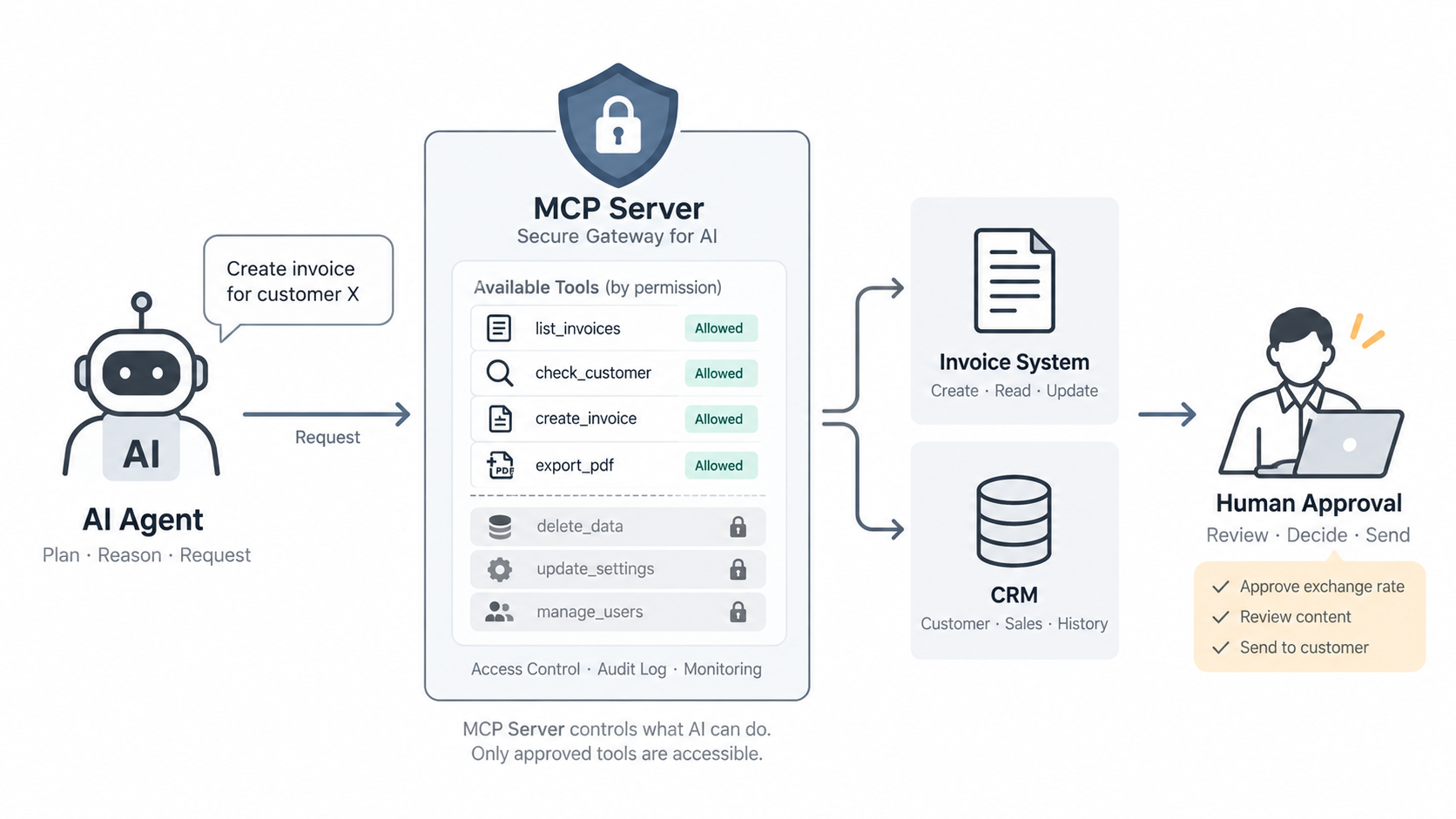
MCP takes a different approach: it carves out "the connection point between an AI Agent and a business system" as a Server, and explicitly exposes it in the form of Tools.
An MCP Server is, in effect, "a business API counter exposed to an AI Agent." The AI can only call the Tools (functions) that the server exposes — nothing else. What it can and can't do is clearly defined in code.
II. The problem Bunbu faced
At Bunbu, we manage customer invoices through an internal CRM. At month-end, there's an operational flow of reviewing that month's invoices, generating PDFs, and sending them to customers.
This review process is governed by rules such as:
- Is the invoice number assigned according to project-specific rules (project abbreviation plus year/month, etc.)?
- Do the invoice date and payment due date follow the customary convention?
- Does the exchange rate deviate from the current rate in the system?
- Is the VAT setting appropriate for the customer's country and contract?
- Does the invoice language match the customer's country?
- Does the line-item wording follow our internal naming convention (e.g., stating the applicable month)?
- Among currently active projects, are there any that don't yet have an invoice for this month?
Each of these checks is simple on its own, but the more invoices there are, the easier it is to miss something. At the same time, it's not something that should all be auto-corrected.
Exchange rates, for example, involve a business decision about which point in time's rate to use. Line-item wording, too, depends on the specifics of the project — there's no single "correct" phrasing. If the AI rewrites these on its own to look "plausible," that's actually dangerous.
In other words, what we needed was a mechanism that would automate what can be mechanically and reliably judged as correct, while always leaving anything requiring judgment to a human.
III. Our approach: solving it with an MCP Server
At Bunbu, we implemented this invoice review process as an MCP Server. The AI Agent (Claude) accesses invoice data in the CRM by calling the Tools this server exposes.
1. Breaking the work down into Tools
The Tools we implemented include, for example:
- list_month_invoices — retrieves the list of invoices for the target month, along with any active projects that don't yet have one
- check_invoice — checks a single invoice against the rules and returns a list of issues
- fix_invoice — automatically fixes only the issues that can be mechanically and reliably corrected
- update_invoice_currency_rate / update_invoice_item_name — applies a value once a human has decided it
- create_invoice_pdf — generates and stamps the PDF for an invoice once review is complete (does not send it)
The AI Agent combines these Tools to carry out a full workflow: list this month's invoices, check them one by one, fix what can be fixed, and confirm anything requiring judgment with a person.
2. Safety is guaranteed by code, not by operational rules
The most important design principle for this server was constraining the AI's behavior through the server's code, not through prompt instructions.
Concretely, we built the following constraints into the server:
- Only invoices in draft status can be modified or have their PDF regenerated. Invoices already sent to a customer (unpaid / paid) can never be changed or have their PDF recreated
- Tools that modify data can only be called by a role with the right permissions (admin); a view/check-only role (accountant) cannot execute them
- Every change is recorded in an audit log that shows who made it
- Exchange rates are never auto-corrected. If a deviation is detected, the Tool only surfaces "the current rate" versus "the system-calculated rate" — a human must always specify which one to use
- If required information is missing — for example, a project without a short name — the AI does not guess the invoice number. It raises a warning and prompts a human to fix the setup
Simply instructing the AI "please don't do X" isn't enough — eventually, an unexpected input or interpretation will cross that line. The boundary needs to be enforced through code, by restricting which Tools can even be called, not through the prompt.
3. The final step — "sending it to the customer" — is deliberately not automated
We've automated everything up through PDF generation, but the act of emailing that PDF to a customer is deliberately kept outside the AI Agent's scope.
The very last action in a billing workflow — something that touches the relationship with a customer directly — is always executed by a human after a final check. This isn't so much a technical constraint as a deliberate business decision.
IV. Key design principles
Building this taught us three things that matter when integrating an AI Agent into an internal business process.
1. What can be automated and what should be automated are different questions
Technically, it's possible to auto-correct exchange rates, or even auto-send invoices. But that doesn't mean it's the right call. Where to draw the line between automation and human judgment isn't something to ask the AI — it's a design decision that has to be made by a human who understands the business.
2. Safety comes from the system, not the prompt
No matter how carefully you word an AI Agent's instructions, they're still just a "request." By implementing constraints in the server's code — no changes unless status is draft, no execution without the right role — safety is guaranteed regardless of how the AI behaves.
3. Break things into small, clearly-scoped Tools
Rather than building one large "process the invoice" Tool, we broke the work down into units — list, check, fix, generate PDF — and defined the required permissions and scope (e.g., draft-only) individually for each. This keeps it always clear what the AI can do, and how far.
V. A message from Bunbu
MCP provides a standard way to connect an AI Agent to an existing business system. What matters is that MCP itself doesn't guarantee safety.
Deciding which Tools to expose, what constraints each one should carry, and where the line to human judgment should sit — that design work still belongs, as it always has, to engineers who understand both the business and the system.
At Bunbu, we support the design and implementation of MCP Servers like this for existing business systems, CRMs, and ERPs.
Understand where the existing system stands today → work out how much can safely be handed to AI → design the scope that can be safely automated as Tools → roll it into the business in stages
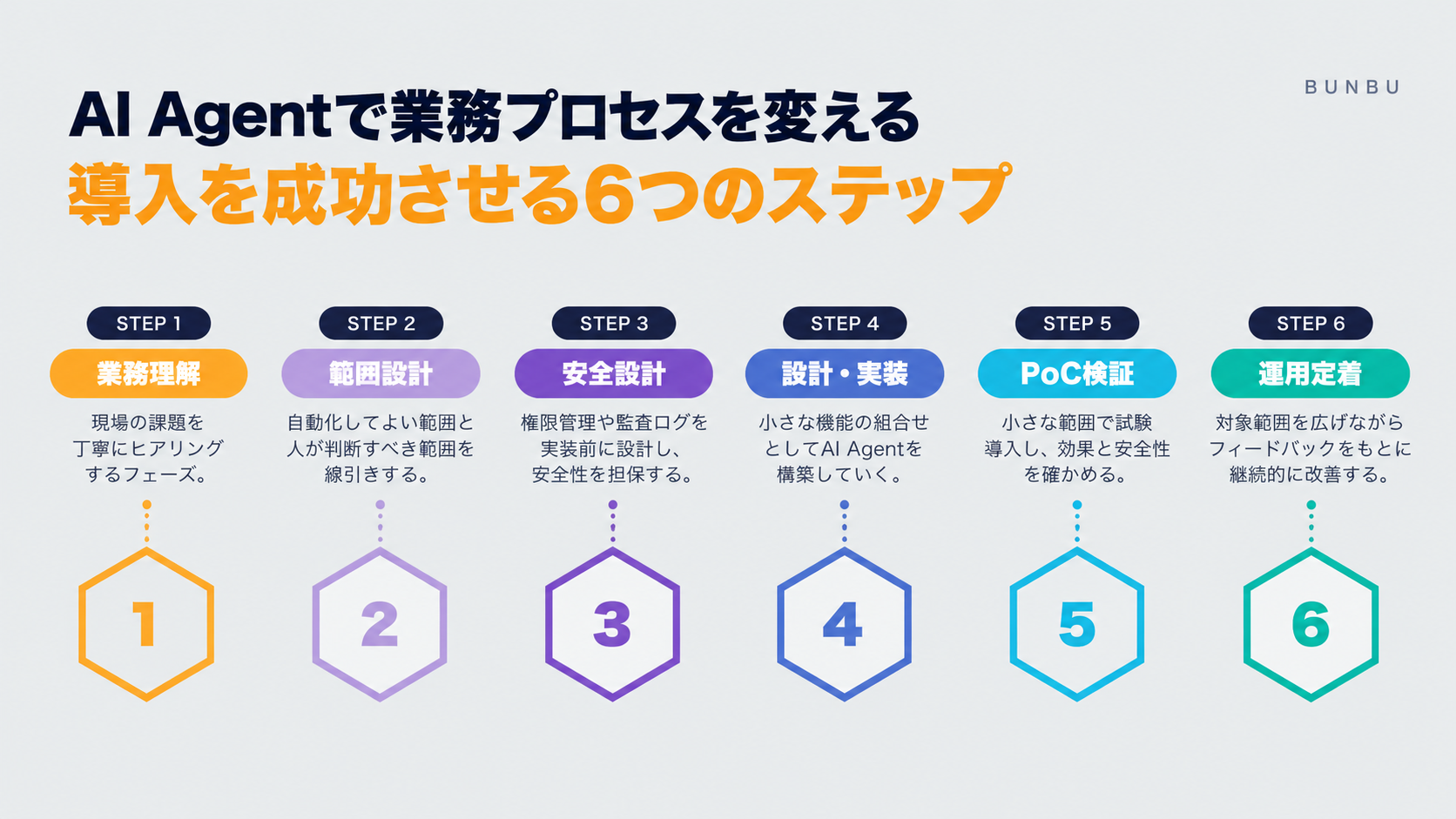
Rather than "leaving everything to AI," building a mechanism to safely collaborate with AI — that's Bunbu's approach to business system integration in the age of AI.